Improve Accessibility and SEO for your PDFs
PDFs are widely used for publishing documents online, but they are not always accessible to screen readers or optimized for search engines. When embedded in a browser, PDFs can limit how assistive technologies access content and how much text search engines can index.
FlowPaper solves this by converting PDF documents into structured HTML5. This makes content easier to read and navigate for users with visual impairments, while also allowing search engines to crawl and index the text properly.
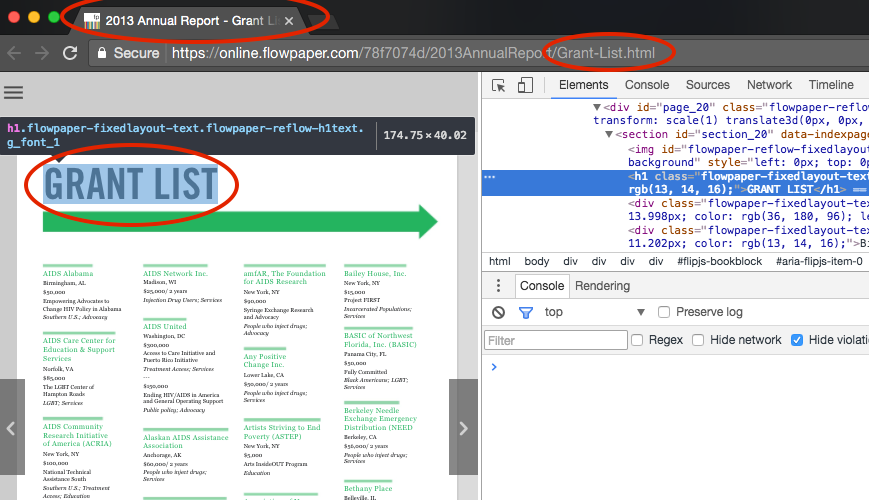
Improved accessibility mode
Some PDFs contain embedded fonts or encoding issues that make text difficult for screen readers to interpret. Even if the document looks correct visually, the underlying text structure may not be readable.
FlowPaper’s improved accessibility mode enhances the output by adding a clean, human-readable text layer alongside the rendered content. This allows screen readers to read the content aloud more accurately and ensures better interpretation by search engines.
How to enable improved accessibility and SEO
To enable these features:
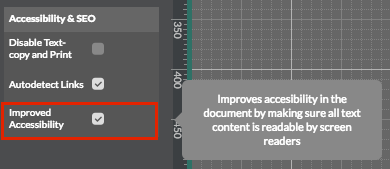
1) Open your PDF in the Desktop Publisher
2) Go to Settings
3) In the Accessibility and SEO section:
-
Enable Improved accessibility
-
Enable Improved SEO
4) Click Apply Settings
5) Publish your document as usual
Why this matters
Making your PDFs accessible means users with visual impairments can fully interact with your content through screen readers. At the same time, exposing content as structured HTML improves how search engines understand and rank your documents.
By combining accessibility and SEO, FlowPaper helps you reach a wider audience while delivering a better user experience.
Next steps
Learn how to enable and configure social sharing for your published documents
Track Publications with Google Analytics
Use heatmap analytics so you can see which parts of your publication readers engage with most