How to Embed a Flipbook in Email (Using a GIF Preview)
Interactive publications cannot be fully embedded in most email clients. An animated GIF preview helps you present your content clearly and drive more clicks.
This allows recipients to see a preview directly in the email and then click through to view the full publication online.
Convert your publication to an animated GIF
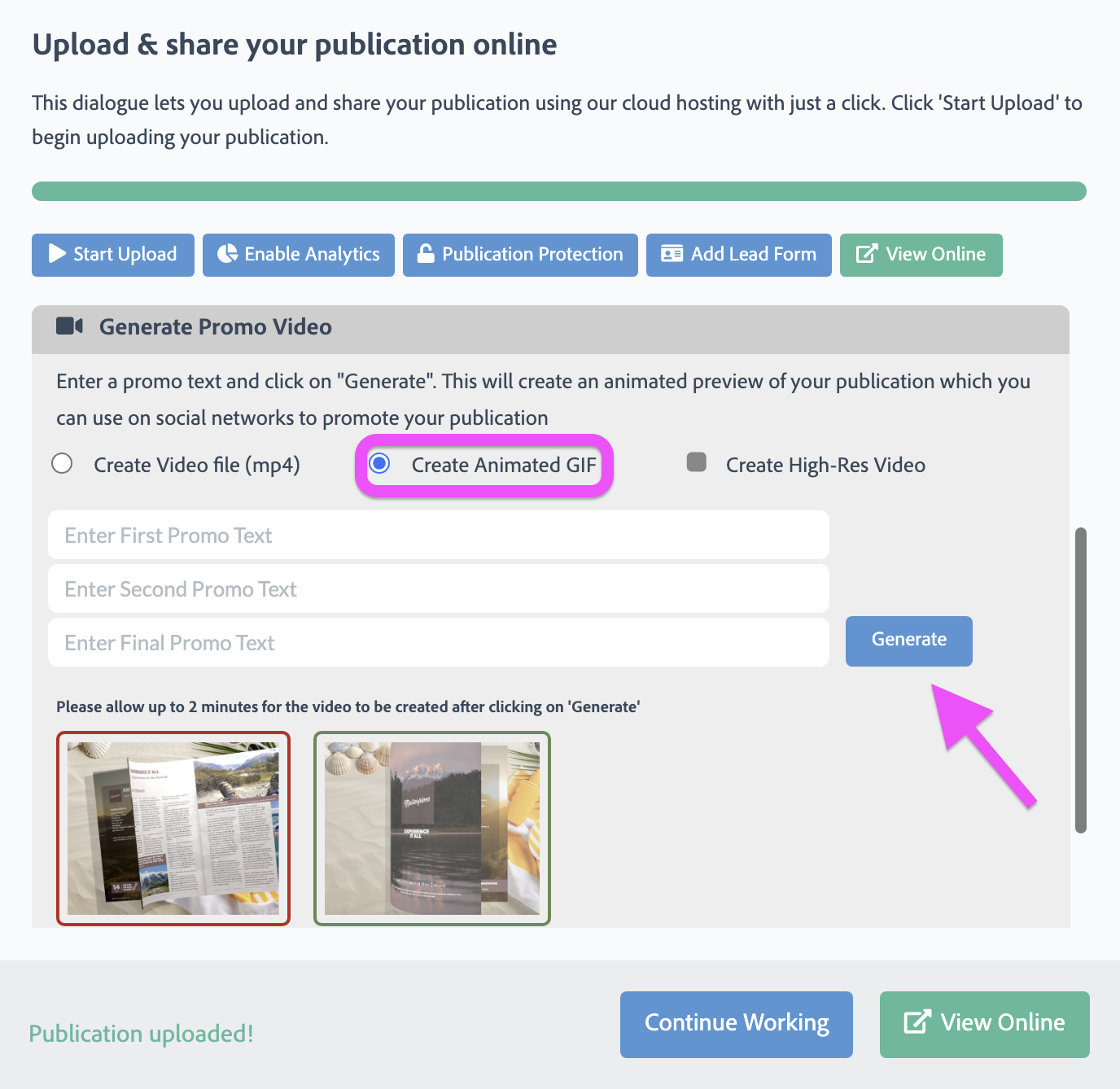
To create an email-friendly preview, upload your PDF to FlowPaper and use the Zine template, which supports animated GIF export.
After preparing your document, click Publish, select Cloud Hosted, and Start upload. Once the publication is available online, you will see the Create Animated GIF option.
You can then generate and download the GIF to your computer.
Add the preview to your email
Insert the GIF into your email just like a regular image. In most email clients, you can simply drag and drop it into your message.
To direct readers to the full publication, add a link or call-to-action (such as a text link) below the image.
Using an animated GIF preview is an effective way to increase attention in inboxes while still directing readers to your full flipbook experience.
Read next
How to Customize a PDF and Make It Interactive Online